Difference between revisions of "Exit Gate"
| (3 intermediate revisions by one other user not shown) | |||
| Line 5: | Line 5: | ||
|retrieved=N/A | |retrieved=N/A | ||
|location=Most levels | |location=Most levels | ||
| − | |games={{Icon|DTL}} | + | |games={{Icon|DTL}}<br>{{Icon|Wii}} |
|boxcolor=#ff943a}} | |boxcolor=#ff943a}} | ||
{{Quote | {{Quote | ||
| Line 11: | Line 11: | ||
|character=[[Isaac]] | |character=[[Isaac]] | ||
}} | }} | ||
| − | '''Exit Gates''' are the end-of-level doors that appear at the end of almost every level in ''[[Drawn to Life]]'', except [[ | + | '''Exit Gates''' are the end-of-level doors that appear at the end of almost every level in ''[[Drawn to Life]]'', except boss Levels and the [[Snow Fields]], and every level in ''[[Drawn to Life: The Next Chapter (Wii)]]'', except for [[Circi Loves Wilfre]]. |
| + | |||
| + | In the original Drawn to Life, gates can only be opened to exit the level if all four pieces of the level's [[Template]] have been found and all of the [[Raposa]] in the level have been rescued. In Drawn to Life: The Next Chapter (Wii), most of the gates are locked until the story challenge has been met, whether that be making a creation, rescuing a Raposa, or finding an object. | ||
=={{Icon|NoteIcon}} Tips== | =={{Icon|NoteIcon}} Tips== | ||
| Line 17: | Line 19: | ||
** Exceptions to this include levels such as [[Gearworks]]. | ** Exceptions to this include levels such as [[Gearworks]]. | ||
| − | =={{ | + | == {{IconSVG|Trivia}} Trivia == |
| − | *The four collected Template pieces act similarly to keys that open the | + | *The four collected [[Template]] pieces act similarly to keys that open the gate. Once the [[Hero]] reaches an Exit Gate, the slots on the gate will lock down on all four of the Template pieces, and then the large padlock on the gate will fall. After this, the Hero may walk through the gate, returning to [[Rapoville]]. |
| − | * | + | *[[Raposa]] seem to teleport to the exit gate once rescued. |
| − | + | *All Exit Gates lead back to the gate the Hero entered the level from. | |
| − | *All Exit Gates lead back to the gate | + | *Exit Gates cannot be seen in boss levels. |
| − | * Exit Gates cannot be seen in boss levels. | + | **This is because there aren't templates to be collected during those levels. |
| − | **This is | + | *In ''[[Drawn to Life: The Next Chapter (Wii)]]'', the exit gates look identical to the World Gate the level is from. |
=={{Icon|Painting}} Media == | =={{Icon|Painting}} Media == | ||
| + | <center> | ||
<gallery widths="310" position="center" spacing="small" bordercolor="transparent" captiontextcolor="#8e8e8e" captionalign="center"> | <gallery widths="310" position="center" spacing="small" bordercolor="transparent" captiontextcolor="#8e8e8e" captionalign="center"> | ||
ExitSign.png|A sign showing that an Exit Gate is nearby. | ExitSign.png|A sign showing that an Exit Gate is nearby. | ||
| Line 31: | Line 34: | ||
UnlockedExitGate.png|An unlocked Exit Gate. | UnlockedExitGate.png|An unlocked Exit Gate. | ||
OpenedExitGate.png|An Exit Gate with its doors open. | OpenedExitGate.png|An Exit Gate with its doors open. | ||
| + | EGJangala.png|An Exit Gate in [[Jangala]]. | ||
</gallery> | </gallery> | ||
| + | </center> | ||
| + | [[Category:Levels]] | ||
| + | [[Category:Drawn to Life]] | ||
| + | [[Category:Levels in Drawn to Life]] | ||
Latest revision as of 14:55, 22 June 2022
| Exit Gate | |
| Use | Allows The Hero to exit a level. |
| Village Object | No |
| Retrieved | N/A |
| Location | Most levels |
| Games |  
|

Exit Gates are the end-of-level doors that appear at the end of almost every level in Drawn to Life, except boss Levels and the Snow Fields, and every level in Drawn to Life: The Next Chapter (Wii), except for Circi Loves Wilfre.
In the original Drawn to Life, gates can only be opened to exit the level if all four pieces of the level's Template have been found and all of the Raposa in the level have been rescued. In Drawn to Life: The Next Chapter (Wii), most of the gates are locked until the story challenge has been met, whether that be making a creation, rescuing a Raposa, or finding an object.
 Tips[edit]

- There are often picket signs or other markers that indicate that The Hero is approaching an Exit Gate. These are useful as they allow the player a chance to go back and look for any skipped Secrets or items before the level is ended.
- Exceptions to this include levels such as Gearworks.
Trivia[edit]
- The four collected Template pieces act similarly to keys that open the gate. Once the Hero reaches an Exit Gate, the slots on the gate will lock down on all four of the Template pieces, and then the large padlock on the gate will fall. After this, the Hero may walk through the gate, returning to Rapoville.
- Raposa seem to teleport to the exit gate once rescued.
- All Exit Gates lead back to the gate the Hero entered the level from.
- Exit Gates cannot be seen in boss levels.
- This is because there aren't templates to be collected during those levels.
- In Drawn to Life: The Next Chapter (Wii), the exit gates look identical to the World Gate the level is from.
 Media[edit]


A sign showing that an Exit Gate is nearby.

An Exit Gate mending template pages.
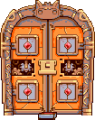
An unlocked Exit Gate.
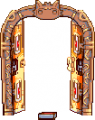
An Exit Gate with its doors open.

An Exit Gate in Jangala.


