Difference between revisions of "Sea Harp"
m |
|||
| Line 55: | Line 55: | ||
RaposaOnSeaHarpInLevel.png|Ditto but in a level. | RaposaOnSeaHarpInLevel.png|Ditto but in a level. | ||
SeaHarp Preview.png|A lone Sea Harp swimming near some coins. | SeaHarp Preview.png|A lone Sea Harp swimming near some coins. | ||
| − | SeaHarpBeta.png|Beta sprites of the Sea Harps, found on [[ | + | SeaHarpBeta.png|Beta sprites of the Sea Harps, found on [[Drawn to Life: The Next Chapter Credits|Chern Fai's]] [https://cocefi.com/drawntolife website]. |
</gallery> | </gallery> | ||
|-|Sound= | |-|Sound= | ||
Latest revision as of 14:40, 14 March 2024
| Sea Harp | |
| Information | |
|---|---|
| Species | Fish |
| Variant | Sea Harp |
| Health | 
|
| Attack Type | Contact |
| Item Drops | 
|
| Games | 
|


Sea Harps are seahorse-like enemies in Drawn to Life: The Next Chapter. They are found within some underwater Watersong levels. They make their first appearance in Rhythmic Reef. Sea Harps do not actively pursue the Hero, but their fast zig-zag movement may make them difficult to combat or avoid. Due to this, the best time to attack is when they're paused to switch directions.
 Appearance[edit]

Sea Harps are gold and blue seahorse-like creatures. They heavily resemble the shape of harps, thus earning their name. Their heads seems to take the appearance of a trumpet.
 Levels[edit]


Trivia[edit]
- They are first seen during the second section of the Rhythmic Reef level and are the second fish variant the player encounters.
- Sea Harps remain idle off-screen until the player approaches them.
- It is unclear as to why they have a unique sprite for this action.
- When damaged, the "strings" on their body will snap.
- The graphics for Sea Harps' diagonal movement is processed by the game rather than through sprites, meaning their texture may appear jagged or "rough" within levels.
 Media[edit]

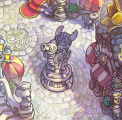
A statue in eastern Watersong depicting a Raposa riding a Sea Harp.

Ditto but in a level.

A lone Sea Harp swimming near some coins.

Beta sprites of the Sea Harps, found on Chern Fai's website.



Enemy Death
