Difference between revisions of "Action Drawing"
(alt) |
m |
||
| Line 1: | Line 1: | ||
{{Quality}} | {{Quality}} | ||
{{Disambig|the [[Action Draw Altar]]}} | {{Disambig|the [[Action Draw Altar]]}} | ||
| + | {{Quote | ||
| + | |text=You can draw platforms for your Hero to use! Your goal is to reach the exit door!<br>Select a color from the Action Draw menu and draw! | ||
| + | |character=Action Draw Instruction Prompt <small>[[Drawn to Life: The Next Chapter]]</small> | ||
| + | }} | ||
| + | {{Quote | ||
| + | |text=An Action Drawing Canvas shows up as an outlined box on the screen.<br>Point the Wii Remote at the box and press the {{Icon|WiiB}} button to quickly draw an object. | ||
| + | |character=Action Draw Instruction Prompt <small>[[Drawn to Life: The Next Chapter (Wii)]]</small> | ||
| + | }} | ||
'''Action Drawing''' is a feature in ''[[Drawn to Life: The Next Chapter]]'' and ''[[Drawn to Life: The Next Chapter (Wii)]]'' that allows the player to draw directly into the game in order to navigate certain environments. Action Drawing helps the player traverse spiky pits or avoid falling into endless voids, and act as a bit of a puzzle element thrown into the game's levels. | '''Action Drawing''' is a feature in ''[[Drawn to Life: The Next Chapter]]'' and ''[[Drawn to Life: The Next Chapter (Wii)]]'' that allows the player to draw directly into the game in order to navigate certain environments. Action Drawing helps the player traverse spiky pits or avoid falling into endless voids, and act as a bit of a puzzle element thrown into the game's levels. | ||
| Line 14: | Line 22: | ||
== {{Icon|CreationIcon}} Colors == | == {{Icon|CreationIcon}} Colors == | ||
<tabber> | <tabber> | ||
| − | |||
| − | |||
| − | |||
| − | |||
| − | |||
| − | |||
| − | |||
| − | |||
| − | |||
| − | |||
|-|Drawn to Life: The Next Chapter (DS)= | |-|Drawn to Life: The Next Chapter (DS)= | ||
===Black=== | ===Black=== | ||
| + | {{Quote|text=You can now use black! Don't just stand still. Give it a try!|character=''Drawn to Life: The Next Chapter (DS)'' Prompt}} | ||
| − | |||
| − | |||
Lines or platforms drawn with the black ink function as ordinary platforms. They have no additional effects. | Lines or platforms drawn with the black ink function as ordinary platforms. They have no additional effects. | ||
The color is introduced to [[Drawn to Life: The Next Chapter]] in the level [[Baki Basement]]. | The color is introduced to [[Drawn to Life: The Next Chapter]] in the level [[Baki Basement]]. | ||
| − | |||
===Yellow=== | ===Yellow=== | ||
| + | {{Quote|text=You can now use yellow! This can be used to reach new heights!|character=''Drawn to Life: The Next Chapter (DS)'' Prompt}} | ||
| − | |||
| − | |||
Platforms drawn with Yellow ink will quickly rise up into the air once The Hero touches them, allowing them to access areas higher up. Likewise, they do not reappear once used, and must be redrawn if the player falls off and has to start again. This can sometimes mean having the Hero forcibly die if they are stuck. | Platforms drawn with Yellow ink will quickly rise up into the air once The Hero touches them, allowing them to access areas higher up. Likewise, they do not reappear once used, and must be redrawn if the player falls off and has to start again. This can sometimes mean having the Hero forcibly die if they are stuck. | ||
This color is introduced in ''[[Drawn to Life: The Next Chapter]]'' in the level [[Crystal Caverns]]. | This color is introduced in ''[[Drawn to Life: The Next Chapter]]'' in the level [[Crystal Caverns]]. | ||
| − | |||
===Blue=== | ===Blue=== | ||
| + | {{Quote|text=You can now use blue! This should give you a sinking feeling!|character=''Drawn to Life: The Next Chapter (DS)'' Prompt}} | ||
| − | |||
| − | |||
Platforms drawn with Blue ink will quickly fall when The Hero lands on them, allowing them to access areas further down. These platforms have the inherent danger of having The Hero fall into a pit if the jump off them is not timed properly, and they must be redrawn if the player uses them but fails to complete the segment. | Platforms drawn with Blue ink will quickly fall when The Hero lands on them, allowing them to access areas further down. These platforms have the inherent danger of having The Hero fall into a pit if the jump off them is not timed properly, and they must be redrawn if the player uses them but fails to complete the segment. | ||
This color is introduced to [[Drawn to Life: The Next Chapter]] in the level [[Cosmic Bog]]. | This color is introduced to [[Drawn to Life: The Next Chapter]] in the level [[Cosmic Bog]]. | ||
| − | |||
===Green=== | ===Green=== | ||
| − | |||
{{Quote|text=You can now use green! It'll put a spring in your step!|character=''Drawn to Life: The Next Chapter (DS)'' Prompt}} | {{Quote|text=You can now use green! It'll put a spring in your step!|character=''Drawn to Life: The Next Chapter (DS)'' Prompt}} | ||
| + | |||
Platforms drawn in Green ink do not conform fully to how the player draws them. Instead, they will "straighten out", and form a line with endpoints at the start and end of where the player drew the platform. These platforms will act as a trampoline that The Hero can use to bounce around to avoid potentially dangerous areas or obstacles. The angle that the player draws the platform at will dictate what direction it will catapult The Hero in. | Platforms drawn in Green ink do not conform fully to how the player draws them. Instead, they will "straighten out", and form a line with endpoints at the start and end of where the player drew the platform. These platforms will act as a trampoline that The Hero can use to bounce around to avoid potentially dangerous areas or obstacles. The angle that the player draws the platform at will dictate what direction it will catapult The Hero in. | ||
This color is first introduced in ''[[Drawn to Life: The Next Chapter]]'' in the level [[Scramble Tower]]. | This color is first introduced in ''[[Drawn to Life: The Next Chapter]]'' in the level [[Scramble Tower]]. | ||
| − | + | |-|Drawn to Life: The Next Chapter (Wii)= | |
| + | ===[[File:BlueBrush.png|40px]]'''Blue'''=== | ||
| + | Basic Ink (Blue): Introduced in World 1-1, [[Jangala Floor]]. Creates a static platform or ramp for the Hero to stand on. The Hero can't jump through Basic Ink platforms, unless the player draws the platform without releasing the B button, then jumps above it and immediately releases B, making the platform solid. | ||
| + | |||
| + | ===[[File:RedBrush.png|40px]]'''Red'''=== | ||
| + | Physics Ink (Red): Introduced in World 1-2, [[Jangala Climb]]. In-game explanation: "Action Drawings done in Physics Ink will immediately fall with gravity. They will also be affected by the world, enemies, and more!" | ||
| + | |||
| + | ===[[File:GreenBrush.png|40px]]'''Green'''=== | ||
| + | Bouncy Ink (Green): Introduced in the World 2-1, [[Shadow City Outer Walls]]. In-game explanation: "Action Drawings done in Bouncy Ink will bounce you away from the drawing when you come in contact with it." | ||
| + | |||
</tabber> | </tabber> | ||
| Line 65: | Line 66: | ||
** They are instead given certain types of ink that they can draw with that are dictated by the Action Drawing segment itself. | ** They are instead given certain types of ink that they can draw with that are dictated by the Action Drawing segment itself. | ||
** For example, the player can have access to Blue ink, but only be given Green ink to work with. | ** For example, the player can have access to Blue ink, but only be given Green ink to work with. | ||
| − | * Action Drawing could represent The [[Creator]] themselves helping [[ | + | * Action Drawing could represent The [[Creator]] themselves helping the [[Hero]] throughout their adventures. |
* As seen in the Game Development Document for [[Drawn to Life: The Next Chapter (Wii)]], Action Drawing was called QuickDraw. | * As seen in the Game Development Document for [[Drawn to Life: The Next Chapter (Wii)]], Action Drawing was called QuickDraw. | ||
=={{Icon|PaintingIcon}} Media== | =={{Icon|PaintingIcon}} Media== | ||
| + | <center> | ||
<tabber> | <tabber> | ||
|-|DS= | |-|DS= | ||
| Line 83: | Line 85: | ||
</gallery> | </gallery> | ||
</tabber> | </tabber> | ||
| + | </center> | ||
__NOTOC__ | __NOTOC__ | ||
[[Category:Drawn to Life: The Next Chapter]] | [[Category:Drawn to Life: The Next Chapter]] | ||
[[Category:Drawn to Life: The Next Chapter (Wii)]] | [[Category:Drawn to Life: The Next Chapter (Wii)]] | ||
| − | |||
[[Category:Needs More Images]] | [[Category:Needs More Images]] | ||
Revision as of 22:35, 24 May 2023
This Article Doesn't Adhere to Quality Standards! This normally means that certain vital elements are missing from this page. You can help this Wiki by implementing and filling the missing elements and by correcting any other issues you find. These missing elements normally include section headers, infoboxes, sprites, and galleries. Information provided in this article may also be improperly formatted or contain grammatical issues. If the article adheres to Wiki quality Standards after editing, then please remove the {{Quality}} template and all categories associated with it. You may also look at other pages without this tag to see how articles are properly formatted. |
Not to be confused with the Action Draw Altar.
Select a color from the Action Draw menu and draw!”
–Action Draw Instruction Prompt Drawn to Life: The Next Chapter
Point the Wii Remote at the box and press the
 button to quickly draw an object.”
–Action Draw Instruction Prompt Drawn to Life: The Next Chapter (Wii)
Action Drawing is a feature in Drawn to Life: The Next Chapter and Drawn to Life: The Next Chapter (Wii) that allows the player to draw directly into the game in order to navigate certain environments. Action Drawing helps the player traverse spiky pits or avoid falling into endless voids, and act as a bit of a puzzle element thrown into the game's levels.
Areas where Action Drawing will occur are marked in levels by a sign with a paintbrush on it, and is activated by tapping on the Action Draw Altar near the start of the Action Drawing area.
Once activated, the player will be given a certain number a platforms that they can draw directly into the level. These platforms can be drawn to the players liking, but they are limited to a certain amount of "color" that dictates how long they can make each platform before having to drawn the next one. This is represented as a vial of color that depletes and the player is drawing. Certain areas cannot be drawn in, and are represented as a box with red diagonal lines running through it.
Once finished, the player can use their newly drawn platforms, and have the Hero walk along them to reach the end of the Action Drawing Segment.
Each platform drawn by the player in drawn with a certain type of colored ink. Different ink types will create different platforms that have different interactions with The Hero. As the player progresses through the game, they will be given access to more and more ink types that they can use.
 Colors
Black
–Drawn to Life: The Next Chapter (DS) Prompt
Lines or platforms drawn with the black ink function as ordinary platforms. They have no additional effects.
The color is introduced to Drawn to Life: The Next Chapter in the level Baki Basement.
Yellow
–Drawn to Life: The Next Chapter (DS) Prompt
Platforms drawn with Yellow ink will quickly rise up into the air once The Hero touches them, allowing them to access areas higher up. Likewise, they do not reappear once used, and must be redrawn if the player falls off and has to start again. This can sometimes mean having the Hero forcibly die if they are stuck.
This color is introduced in Drawn to Life: The Next Chapter in the level Crystal Caverns.
Blue
–Drawn to Life: The Next Chapter (DS) Prompt
Platforms drawn with Blue ink will quickly fall when The Hero lands on them, allowing them to access areas further down. These platforms have the inherent danger of having The Hero fall into a pit if the jump off them is not timed properly, and they must be redrawn if the player uses them but fails to complete the segment.
This color is introduced to Drawn to Life: The Next Chapter in the level Cosmic Bog.
Green
–Drawn to Life: The Next Chapter (DS) Prompt
Platforms drawn in Green ink do not conform fully to how the player draws them. Instead, they will "straighten out", and form a line with endpoints at the start and end of where the player drew the platform. These platforms will act as a trampoline that The Hero can use to bounce around to avoid potentially dangerous areas or obstacles. The angle that the player draws the platform at will dictate what direction it will catapult The Hero in.
This color is first introduced in Drawn to Life: The Next Chapter in the level Scramble Tower.
 Blue
Blue

Basic Ink (Blue): Introduced in World 1-1, Jangala Floor. Creates a static platform or ramp for the Hero to stand on. The Hero can't jump through Basic Ink platforms, unless the player draws the platform without releasing the B button, then jumps above it and immediately releases B, making the platform solid.
 Red
Red

Physics Ink (Red): Introduced in World 1-2, Jangala Climb. In-game explanation: "Action Drawings done in Physics Ink will immediately fall with gravity. They will also be affected by the world, enemies, and more!"
 Green
Green
Bouncy Ink (Green): Introduced in the World 2-1, Shadow City Outer Walls. In-game explanation: "Action Drawings done in Bouncy Ink will bounce you away from the drawing when you come in contact with it."

Trivia
- Players don't actually get to choose the type of ink they can draw platforms with.
- They are instead given certain types of ink that they can draw with that are dictated by the Action Drawing segment itself.
- For example, the player can have access to Blue ink, but only be given Green ink to work with.
- Action Drawing could represent The Creator themselves helping the Hero throughout their adventures.
- As seen in the Game Development Document for Drawn to Life: The Next Chapter (Wii), Action Drawing was called QuickDraw.
 Media
Media


An entrance to an Action Drawing level segment. Note the paintbrush icon.
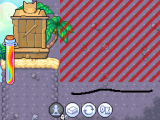
Action Drawing as it appears in game. The player cannot draw within the red lines.
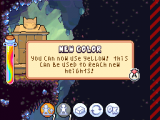
The color Yellow being made available to the player.
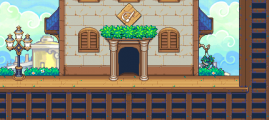
Another Action Drawing segment entrance.


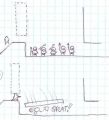
Concept Drawings of Action Drawing being used to crush enemies.
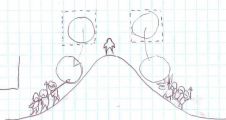
Concept Drawings of Action Drawings being used to roll over enemies.


