Trading Area
| Trading Area | |
| Use | Trading Drawings |
| Village Object | No |
| Retrieved | Unlocked by default |
| Location | Jowee's Room (Turtle Rock) |
| Games | 
|

The Trading Area is a side mode featured exclusively in Drawn to Life: The Next Chapter. It allows players to trade each other's creations made using Draw Mode with the Multi-Card Play format, a wireless connection method shared between Nintendo DS systems when both users have a copy of the same game.
 Process

After walking to the telescope in Jowee's Room, both players can create a share space or join another player's. After both users accept that they want to trade, they are able to swap any creation in the game.
These shared creations are split up into three categories:
- Weapon, grouping the three weapons the Hero can equip;
- Special, grouping every other creation in the game.
The compatibility on creations able to be shared is dependent on how many each player has unlocked. For example, if only the Hero is created, they will only be able to share their design of said creation. As more creations are unlocked, more is able to be traded. They are also able to preview how their creations would look on the top screen before and after they're shared.
Trivia
- Drawn to Life: The Next Chapter is the second (and final) game in the series to utilize Multi-Card Play, following Drawn to Life: SpongeBob SquarePants Edition.
- Unlike that game, which utilized it for multiplayer, The Next Chapter utilizes it solely for trading.
- According to a 2009 GameSpot preview[1], multiplayer minigames were planned to appear but were cut for unknown reasons.
- Unlike that game, which utilized it for multiplayer, The Next Chapter utilizes it solely for trading.
- Despite having a Nintendo Wi-Fi Connection sticker on the box, the version of Drawn to Life: The Next Chapter playable in Drawn to Life Collection still restricts sharing creations to Multi-Card Play.
 Media
Media

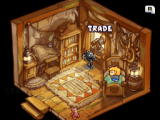
The option in Jowee's Room that leads to the Trading Area.

A message informing both players an available connection was found.


