Sound Menu
This Article Contains Non-Canon Content! This page contains content that is not a part of the official canon. Drawn to Life: SpongeBob SquarePants Edition. Non-canon media includes; theories, fan art, speculation, or games published by developers other than 5th Cell or Digital Continue. |
| Sound Menu | |
| Use | Sound Test |
| Village Object | No |
| Retrieved | After drawing the Stereo |
| Location | Doodle Home |
| Games | 
|

Sound Mode is a hidden mode in Drawn to Life: SpongeBob SquarePants Edition, accessed by pressing the A Button at the Stereo after drawing it. This menu allows the player to listen to a range of songs from the in-game soundtrack, similar to the Sound Test in Isaac's Shop in the mainline games. Unlike those games, however, it is not a sub-menu, rather a separate feature in the Bikini Bottom Home.
 Music Tracks[edit]

A total of 52 tracks can be played in this mode, as listed below in order of their placement.

1: Bonus Track 1
2: Title Screen & Main Menu
3: Bonus Track 2
4: Bonus Track 3
5: Drawing
6: Rearrange Your House
7: Save Game
8: The Krusty Krab
9: Results
10: Game Over
11: Stage Clear
12: Cutscene 2
13: Cutscene 3
14: Bonus Track 4
15: Cutscene 1
16: Tutorial & Uptown Bikini Bottom
17: BiBo Industries
18: Lagoon Circus
19: Blue Sky Flyer
20: Doodled Tower
21: Wild Jungle
22: Mine Cart Racer
23: Perilous Cliffs
24: Bikinos Bottos
25: Pyramid
26: Cliffs of Doom
27: Rock Bottom
28: Dutchman Deck
29: Below Deck
30: No Turning Back
31: Rocket Shootout
32: Moon Surface
33: Space Station
34: Bikini Doodle
35: Lunar Battle
36: Doodle Revenge
37: Asteroid Battle
38: Multi-Card Play Menu
39: Multi-Card Play Draw
40: Multi-Card Play Match
41: Multi-Card Play Results
42: Bikini Bottom Home (Day)
43: Bikini Bottom Map
44: The Jungle Map
45: Deep Sea Map
46: Space & Notebook Land Map
47: Coloring Book Mode Menu
48: Coloring Book Mode 1
49: Coloring Book Mode 2
50: Draw SpongeBob Menu
51: Draw SpongeBob Instructions
52: Draw SpongeBob Learn to Draw
Trivia[edit]
- Drawn to Life: SpongeBob SquarePants Edition is the only non-5th Cell entry to have a sound test mode.
- Sound Menu is the only extra feature in the game unlocked in Bikini Bottom after drawing a creation.
- It is not, however, the sole unlock after drawing a creation in the hub world - drawing the Television unlocks the Staff Credits.
- The four bonus tracks are played exclusively in this mode, although their official names are unknown.
- Some of the tracks are out of order, i.e. BiBo Industries is the second in the Bikini Bottom group rather than the fourth.
 Media[edit]

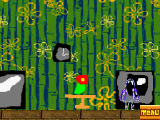
A Stereo in the Doodle Home, which activates this mode.

The Needle that plays the Vinyls.

A SpongeBob-themed Vinyl.


