Plug
From Drawn to Life Wiki
This Article Contains Non-Canon Content! This page contains content that is not a part of the official canon. Drawn to Life: SpongeBob SquarePants Edition. Non-canon media includes; theories, fan art, speculation, or games published by developers other than 5th Cell or Digital Continue. |
“Cling to Plugs with your Claws and pull them from the wall!”
–Draw Prompt
The Plug is a creation in Drawn to Life: The Next Chapter (Wii) that is drawn in Shadow Labyrinth.
Once drawn, the Plug will appear in Shadow City levels, and the Hero can grab it. When they do, it will move in a predetermined location and slowly return to its original position.
 Appearance

Due to the Plug being a creation object, the appearance of this object is completely dependent on the player.
The preset drawing for this creation is a dark brown cork.
 Levels
 Shadow Labyrinth |
 Shadow Palace |
Trivia

 Media
Media

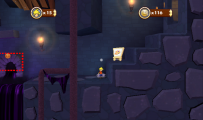
The area where this creation is drawn.
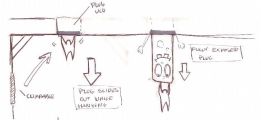
Concept Art for the Plug.


