Pressure Plate
From Drawn to Life Wiki
This Article Contains Non-Canon Content! This page contains content that is not a part of the official canon. Drawn to Life: SpongeBob SquarePants Edition. Non-canon media includes; theories, fan art, speculation, or games published by developers other than 5th Cell or Digital Continue. |
“This button needs to be held down. Draw a Pressure Plate.”
–Draw Prompt
The Pressure Plate is a creation in Drawn to Life: The Next Chapter (Wii) that is drawn in Floating Meadows.
Once drawn, the Pressure Plate will appear in front of some windmills in Eastern Winds. It will also appear in Mari's House in Raposa Village. When the Hero or Physics Ink is on the plate, the nearby windmill will either start or stop spinning depending on its original state.
 Appearance

Due to the Pressure Plate being a creation object, the appearance of this object is completely dependent on the player.
The preset drawing for this creation is a brown button with a grooved pattern on the base.
 Levels


Trivia
- The texture for the default creation has a plate on top of the button that cannot be seen in game.
 Media
Media

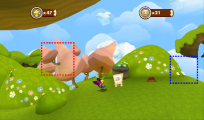
The area where this creation is drawn.


