User:Asph/Understanding the internal format of DTL1 levels
People have been discussing and experimenting with DTL romhacks as of late, so I thought I'd share what I know.
In DTL1, levels are separated by screens. For example, Twilite Wood spans eight screens: 1a, 1b, 1c, 1d, 1e, 1f, 1g, and 1h. Here is screen 1a:
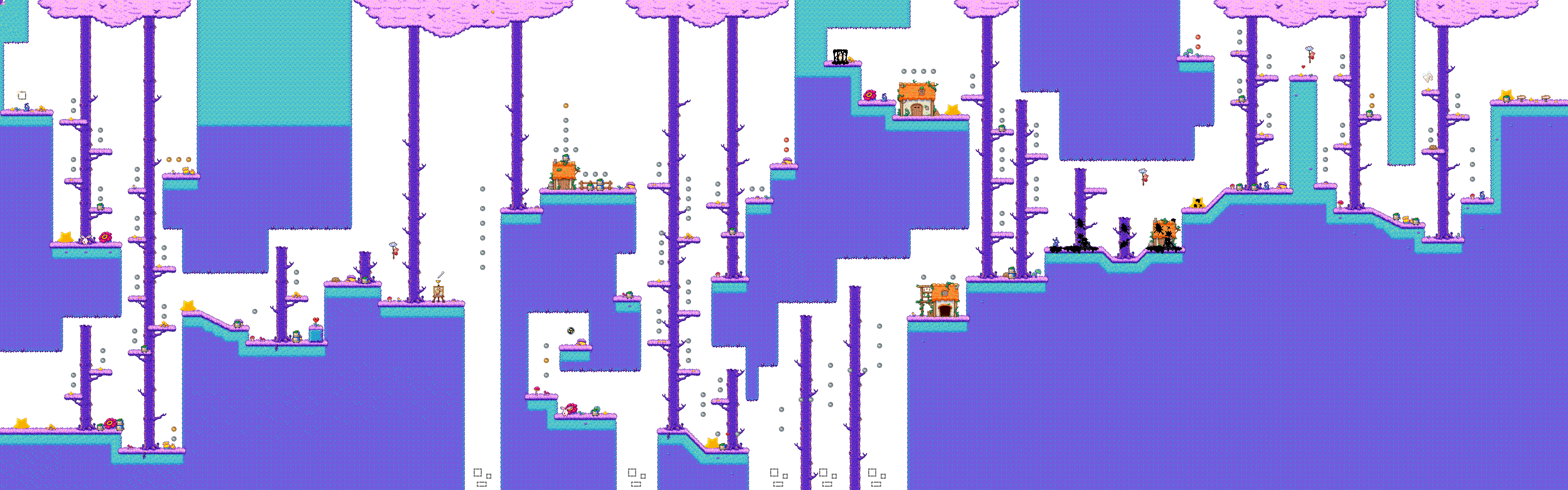
You might be confused, as you might only remember five screens from Twilite Wood. The last three are optional indoor sections, which you get to by entering a house. Generally speaking, outdoors screens span a-e, while f onwards are often indoor sections.
The data for these separate screens are split among four different filetypes, and this page will primarily be about the way these four filetypes store their data. These four filetypes are as follows:
- Tilemap layers, stored in .LX files, with X being the layer. Platforming levels only use a single .L0 file.
- MovE.dsc, which stores both enemies, and drawable creations.
- StatiC.dsc, which stores all kinds of static objects. Collectibles, background objects, shadow goo, and transition points are all stored in here.
- .col files, which house collision, and data regarding water and the like.
But first, let's start with some general knowledge.
Hex Files
All four of these types store their data as hex data. This means that the bytes (numbers ranging from 0-255) which store the data are represented by two characters in base 16. Base 16 means that, instead of representing only 10 numbers (0-9) in a character, we store 16. In this way, 10 is represented by A, 11 is represented by B, and 16 is represented by F. This way, the number 05 is 5, the number 0B is 11, the number 3B is 59, and the number BF is 191. I recommend keeping a hex calculator at hand, and installing a program to help you view this data. Tinke's built-in hex viewer is good enough for simply viewing it, but if you want to be a bit more thorough I'd recommend a program like ImHex or FrHed.
Counters
All four file formats use something that I've dubbed a Counter. It is a set of two bytes, often seen at the start of a list of information, like the list of enemies in a level. The first byte can be any number, like 1E, D5, or BA. The second number is often a low number, like 00, 01, or 02. To get the number that this counter represents, you convert both numbers to decimal, multiply the second number by 256, and add the two numbers together. For example, 1E 01 becomes 30 and 1 in decimal, which makes the final number 30 + 1 * 256 = 286.
Tilemap Layers (.LX files)
Almost every screen the player can walk around in is constructed using tiles. For levels, these tiles are stored in a single .L0 file, while village screens might have a separate tilemap layer on top of of this first one, represented by a separate .L1 file.
These files are the easiest to figure out of the four filetypes explained here. The file starts out with two Counters explained above. As a single counter is 2 bytes, these two counters together are a total of 4 bytes. The first counter represents the width of the screen, and the second represents the height. These are the height in width in tiles, not in pixels. To get the width of the screen in pixels, you can multiply these values by 16 (which is the width of one tile).
Each screen has a corresponding tilemap. Sadly, I don't know where in the game it stores which tileset is used for which screen. so you'll have to match them up yourselves. These tilemaps can be found elsewhere in the game, but the easier way of obtaining them is by just grabbing them from The Spriters's Resource, where Zilten and I have uploaded all of them. Let's take a look at what the average tilemap looks like:

Each tileset is 16 by 16 tiles. Because of this, a tile can be represented by a single byte. Recall that, in hex, a number is represented by two characters in base 16. Because of this, it's quite easy to see what tile a byte represents, as the first character represents the x position of the tile on the tilemap, and the second character represents the y position of the tile in the tilemap. For example, in the tilemap above, byte CB would represent the thirteenth tile from the left, and the twelfth tile from the top, which is the tile with the two small rocks vaguely in the bottom-right.
The bytes for these tiles are stored in rest of the data in this .LX file. The tiles are stored from left to right, from top to bottom. So, first, you get the topmost row of tiles in the screen from left to right, then the second row from the top, etc.. These rows aren't separated by anything, so you need to use the screen width we got previously to know when to go to the next row.
