Difference between revisions of "Clock Chime"
From Drawn to Life Wiki
(Created page with "{{Noncanon}} {{InfoCreation |image = <tabber> |-|Drawn Preset=center |-|Template Page=250px </tabber> |name = Clock Chim...") |
m |
||
| Line 1: | Line 1: | ||
{{Noncanon}} | {{Noncanon}} | ||
| − | {{ | + | {{Infobox/Creation |
|image = | |image = | ||
<tabber> | <tabber> | ||
Revision as of 02:20, 10 December 2021
This Article Contains Non-Canon Content! This page contains content that is not a part of the official canon. Drawn to Life: SpongeBob SquarePants Edition. Non-canon media includes; theories, fan art, speculation, or games published by developers other than 5th Cell or Digital Continue. |
| Clock Chime | |
| Information | |
|---|---|
| Name | Clock Chime |
| Use | Required to open the path to Raposa Village |
| Creation Type | Level Object |
| Has Preset | Yes |
| Template Needed | No |
| Created In/After | Shadow Labyrinth |
| Game(s) | 
|


“Draw the Clock chime.”
–Draw Prompt
The Clock Chime is a creation in Drawn to Life: The Next Chapter (Wii) that is drawn in Shadow Labyrinth.
Once drawn, the Clock Chime will appear on the clock at the end of the Shadow Labyrinth. When all four parts of the clock are drawn, the gate to Raposa Village opens.
 Appearance

Due to the Clock Chime being a creation object, the appearance of this object is completely dependent on the player.
The preset drawing for this creation is a golden ball on a long golden rod.
 Levels
 Shadow Labyrinth |
Trivia

 Media
Media


The area where this creation is drawn.
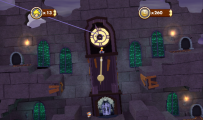
The complete clock at the end of Shadow Labyrinth.


