Difference between revisions of "Switch Activated Platform"
Tags: Advanced mobile edit Mobile web edit Mobile edit |
m |
||
| (7 intermediate revisions by 3 users not shown) | |||
| Line 1: | Line 1: | ||
| − | |||
| − | |||
{{Infobox/Creation | {{Infobox/Creation | ||
|image= | |image= | ||
| − | + | <tabber> | |
| − | |Preset=[[File:FireFlyPlatform.png]] | + | |-|Drawn Preset=[[File:FireFlyPlatform.png|center]] |
| − | | | + | |-|Template Page=[[File:SwitchPlatformTemp.png|center]] |
| + | </tabber> | ||
|name=Switch Activated Platform | |name=Switch Activated Platform | ||
| − | |use=Transport for [[ | + | |use=Transport for the [[Hero]] |
|type=Level Object | |type=Level Object | ||
|template=No | |template=No | ||
| Line 15: | Line 14: | ||
|boxcolor=#008c8c | |boxcolor=#008c8c | ||
}} | }} | ||
| − | + | {{PDisambig|Platform}} | |
{{Quote|text =This platform moves to a different location when Hero hits a jar of fireflies.|character = Design Prompt}} | {{Quote|text =This platform moves to a different location when Hero hits a jar of fireflies.|character = Design Prompt}} | ||
| − | The Switch Activated Platform is first created in the [[Galactic Jungle]] level [[Techno Spires]]. The platform is controlled by a [[Firefly Jar | + | The Switch Activated Platform is first created in the [[Galactic Jungle]] level [[Techno Spires]]. The platform is controlled by a [[Firefly Jar]] that can be turned on or off. The [[Hero]] can do this by either using a weapon, or going into spider form and shooting a web at the jar. |
| − | When | + | When the Hero hits a blue jar, the platform moves to another location. When the Hero hits a green jar, the platform moves, but after a few seconds, the platform returns to its original location. |
== {{Icon|TowerIcon}} Appearance == | == {{Icon|TowerIcon}} Appearance == | ||
| Line 28: | Line 27: | ||
== {{Icon|Button}} Levels == | == {{Icon|Button}} Levels == | ||
| − | + | <tabber> | |
| − | + | |-|Galactic Jungle= | |
| − | + | <table style="width:100%; padding-top:10px;"> | |
| − | + | <tr> | |
| + | <td><center> [[Image:GJ TechnoSpires.png|link=Techno Spires]] <br> [[Techno Spires]] </center></td> | ||
| + | <td><center> [[File:GJ TreetopTurrets.png|link=Treetop Turrets]] <br> [[Treetop Turrets]] </center></td> | ||
| + | </tr> | ||
| + | </table> | ||
| + | |-|Wilfre's Wasteland= | ||
| + | <table style="width:100%; padding-top:10px;"> | ||
| + | <tr> | ||
| + | <td><center> [[Image:WW ToggleTower.png|link=Toggle Tower]] <br> [[Toggle Tower]] </center></td> | ||
| + | <td><center> [[Image:WW CrumblingKeep.png|link=Crumbling Keep]] <br> [[Crumbling Keep]] </center></td> | ||
| + | </tr> | ||
| + | </table> | ||
| + | </tabber> | ||
| − | == {{ | + | == {{IconSVG|Trivia}} Trivia == |
* This creation is similar to the [[3 Way Switch]] creation from the first game. | * This creation is similar to the [[3 Way Switch]] creation from the first game. | ||
* The creation is also referred to as "Switch" in the game. | * The creation is also referred to as "Switch" in the game. | ||
| Line 40: | Line 51: | ||
=={{Icon|Painting}} Media== | =={{Icon|Painting}} Media== | ||
| + | <center> | ||
<gallery orientation="none" position="center" widths="310" spacing="small" bordercolor="transparent" bordersize="small" captiontextcolor="#8e8e8e" captionalign="center" captionposition="below"> | <gallery orientation="none" position="center" widths="310" spacing="small" bordercolor="transparent" bordersize="small" captiontextcolor="#8e8e8e" captionalign="center" captionposition="below"> | ||
SwitchPlatformDrawPrompt.png|The drawing prompt for this creation. | SwitchPlatformDrawPrompt.png|The drawing prompt for this creation. | ||
SwitchPlatformDrawingLocation.png|The area where this creation is drawn. | SwitchPlatformDrawingLocation.png|The area where this creation is drawn. | ||
</gallery> | </gallery> | ||
| − | + | </center> | |
| − | |||
{{Navbox/Creation|Drawn to Life: The Next Chapter|Galactic Jungle|Switch Activated Platform|boxcolor=#008c8c}} | {{Navbox/Creation|Drawn to Life: The Next Chapter|Galactic Jungle|Switch Activated Platform|boxcolor=#008c8c}} | ||
__NOTOC__ | __NOTOC__ | ||
Latest revision as of 23:18, 18 December 2023
| Switch Activated Platform | |
| Information | |
|---|---|
| Name | Switch Activated Platform |
| Use | Transport for the Hero |
| Creation Type | Level Object |
| Has Preset | Yes |
| Template Needed | No |
| Created In/After | Techno Spires |
| Game(s) | 
|


For other uses of Platforms on the wiki, see Platform.
–Design Prompt
The Switch Activated Platform is first created in the Galactic Jungle level Techno Spires. The platform is controlled by a Firefly Jar that can be turned on or off. The Hero can do this by either using a weapon, or going into spider form and shooting a web at the jar.
When the Hero hits a blue jar, the platform moves to another location. When the Hero hits a green jar, the platform moves, but after a few seconds, the platform returns to its original location.
 Appearance[edit]

Due to the Switch Activated Platform being a creation object, the appearance is overall dependent on the player.
They are still confined to the area provided.
 Levels[edit]

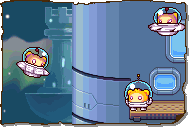

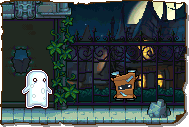
Trivia[edit]
- This creation is similar to the 3 Way Switch creation from the first game.
- The creation is also referred to as "Switch" in the game.
- Despite this, the creation is not a switch.
- Coincidentally, the 3 Way Switch from the first game is also referred to as a switch.
 Media[edit]

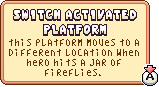
The drawing prompt for this creation.

The area where this creation is drawn.


