Difference between revisions of "Birds"
From Drawn to Life Wiki
| (4 intermediate revisions by 2 users not shown) | |||
| Line 1: | Line 1: | ||
| − | {{Noncanon}} | + | {{Noncanon|boxcolor=#5a5a73}} |
{{Infobox/Creation | {{Infobox/Creation | ||
|image = | |image = | ||
<tabber> | <tabber> | ||
| − | |-|Drawn Preset=[[File:WiiBirds.png|center]] | + | |-|Drawn Preset=[[File:WiiBirds.png|center|alt=Creation preset]] |
| − | |-|Template Page=[[File:Draw7x7.png|center|250px]] | + | |-|Template Page=[[File:Draw7x7.png|center|250px|alt=Creation template]] |
</tabber> | </tabber> | ||
|name = Birds | |name = Birds | ||
| Line 13: | Line 13: | ||
|created = [[Roab Plateaus]] | |created = [[Roab Plateaus]] | ||
|games = {{Icon|Wii}} | |games = {{Icon|Wii}} | ||
| + | |boxcolor=#5a5a73 | ||
}} | }} | ||
{{Quote | {{Quote | ||
| Line 31: | Line 32: | ||
<table style="width:100%; padding-top:10px;"> | <table style="width:100%; padding-top:10px;"> | ||
<tr> | <tr> | ||
| − | <td><center> [[File:RoabPlateausIcon.png|85px|link=Roab Plateaus]] <br> [[Roab Plateaus]] </center></td> | + | <td><center> [[File:RoabPlateausIcon.png|85px|link=Roab Plateaus|alt=Level page link]] <br> [[Roab Plateaus]] </center></td> |
</tr> | </tr> | ||
</table> | </table> | ||
| − | =={{ | + | == {{IconSVG|Trivia}} Trivia == |
* This is one of many creations to only appear in the level they are drawn in. | * This is one of many creations to only appear in the level they are drawn in. | ||
=={{Icon|Painting}} Media== | =={{Icon|Painting}} Media== | ||
| + | <center> | ||
<gallery widths="310" captionsize="medium" captiontextcolor="#8e8e8e" bordersize="none" bordercolor="transparent" captionalign="center" spacing="small" position="center"> | <gallery widths="310" captionsize="medium" captiontextcolor="#8e8e8e" bordersize="none" bordercolor="transparent" captionalign="center" spacing="small" position="center"> | ||
| − | + | WiiBirdsDrawingLocation.png|alt=Game screenshot|The area where this creation is drawn. | |
</gallery> | </gallery> | ||
| − | + | </center> | |
| − | + | {{Navbox/Creation|Drawn to Life: The Next Chapter (Wii)|Eastern Winds|Roab Plateaus|Birds|boxcolor=#5a5a73}} | |
__NOTOC__ | __NOTOC__ | ||
[[Category:Drawn to Life: The Next Chapter (Wii)]] | [[Category:Drawn to Life: The Next Chapter (Wii)]] | ||
Revision as of 02:00, 6 June 2024
This Article Contains Non-Canon Content! This page contains content that is not a part of the official canon. Drawn to Life: SpongeBob SquarePants Edition. Non-canon media includes; theories, fan art, speculation, or games published by developers other than 5th Cell or Digital Continue. |
| Birds | |
| Information | |
|---|---|
| Name | Birds |
| Use | None |
| Creation Type | Level Object |
| Has Preset | Yes |
| Template Needed | No |
| Created In/After | Roab Plateaus |
| Game(s) | 
|


“Birds just love to make nose and flap around.”
–Draw Prompt
The Birds are a creation in Drawn to Life: The Next Chapter (Wii) that are drawn in Roab Plateaus.
Once drawn, the Birds will appear flying in the background of certain areas in the level. They have no impact on game play whatsoever, and are purely cosmetic.
 Appearance

Due to the Birds being a creation object, the appearance of this object is completely dependent on the player.
The preset drawing for this creation is two, grey, v-shaped birds.
 Levels
 Roab Plateaus |
Trivia
- This is one of many creations to only appear in the level they are drawn in.
 Media
Media

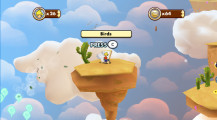
The area where this creation is drawn.

