Difference between revisions of "Boulder"
(Created page with "{{InfoCreation |image = center |name = Boulder |use = Used to activate pressure plates (switches) |type = Level Object...") |
|||
| (14 intermediate revisions by 4 users not shown) | |||
| Line 1: | Line 1: | ||
| − | {{ | + | {{Infobox/Creation |
| − | |image = [[File:DrawingBoulder.png|center]] | + | |image = [[File:DrawingBoulder.png|center|alt=Creation template]] |
|name = Boulder | |name = Boulder | ||
|use = Used to activate pressure plates (switches) | |use = Used to activate pressure plates (switches) | ||
| Line 8: | Line 8: | ||
|created = [[Rapocity]] | |created = [[Rapocity]] | ||
|games = {{Icon|DTL}} | |games = {{Icon|DTL}} | ||
| + | |boxcolor=#6363c5 | ||
}} | }} | ||
| + | {{disambig|[[Boulder (SpongeBob SquarePants Edition)|the SpongeBob creation]]}} | ||
{{Quote | {{Quote | ||
|text = Draw a boulder to activate switches! | |text = Draw a boulder to activate switches! | ||
| Line 16: | Line 18: | ||
Boulders can be pushed by [[Hero|The Hero]] using {{Icon|YButton}} and are used to activate switches within levels. Once a boulder is pushed onto a switch, a platform will be raised allowing, The Hero to advance through to otherwise inaccessible areas. | Boulders can be pushed by [[Hero|The Hero]] using {{Icon|YButton}} and are used to activate switches within levels. Once a boulder is pushed onto a switch, a platform will be raised allowing, The Hero to advance through to otherwise inaccessible areas. | ||
| + | |||
| + | == {{Icon|Tower}} Appearance == | ||
| + | Due to the Boulder being a creation object and having no pre-drawn preset or guide, the appearance of this object is completely dependent on the player. | ||
| + | |||
| + | They are still confined to a circular 3048<small>px</small> area. | ||
| + | |||
| + | =={{Icon|Button}} Levels== | ||
| + | <tabber> | ||
| + | |-|City Gate= | ||
| + | <table style="width: 100%; padding: 10px;"> | ||
| + | <tr> | ||
| + | <td><center> [[File:Th_city001.png|link=Rapocity]] <br> [[Rapocity]] </center></td> | ||
| + | </tr> | ||
| + | </table> | ||
| + | </tabber> | ||
| + | |||
| + | == {{IconSVG|Trivia}} Trivia == | ||
| + | * If [[Hero|The Hero]] is in the process of pushing a boulder then jumps, the "pushing" animation is retained until The Hero touches the ground again. | ||
| + | * The Hero doesn't need to be directly to the right or left of the Boulder in order to push it. | ||
| + | * Boulders are among the only non-transportation creations to display a secondary help message when drawn. | ||
| + | * Boulders have momentum and can continue to move after falls or player interaction. | ||
| + | * The second-to-last Boulder creation can phase through the platform to its left and fall out of the world. | ||
| + | * Though the Boulder creation acts as a solid platform to the player, enemies are unable to interact with them and will simply phase through. | ||
| + | ** Likewise, enemies are also unable to interact with the platforms this creation moves. | ||
| + | * Boulders are the largest level creation relative to the hero's initial height. | ||
| + | * The Hero uses a unique "pushing" animation when moving this creation. | ||
| + | * The Boulder creation can be pushed out of the world in some segments of [[Rapocity]]. Doing so will make the level impossible.<ref> [[File:Boulder_and_Hero_Stuck.png|alt=Game screenshot]]</ref> | ||
| + | |||
| + | == {{Icon|Painting}} Media== | ||
| + | <center> | ||
| + | <gallery widths="310" captionsize="medium" captiontextcolor="#8e8e8e" bordersize="none" bordercolor="transparent" captionalign="center" spacing="small" position="center"> | ||
| + | BoulderDrawArea.png|alt=Game screenshot|The area in which the Boulder is first drawn. | ||
| + | Pushing_Boulder.png|alt=Game screenshot|A hero pushing a boulder. | ||
| + | Boulder_Size_Comparison.png|alt=Game screenshot|A boulder compared to a hero. | ||
| + | Boulder and Hero Stuck.png|alt=Game screenshot|A boulder creation stuck in an inaccessible location after falling. The player is also stuck and must reset the level. | ||
| + | Boulder_Dialog.png|alt=Game screenshot|The dialog showing how to use the Boulder creation. | ||
| + | Pressure Plate.png|alt=Game screenshot|The switches the boulder creation must rest on for the platforms to move. | ||
| + | </gallery> | ||
| + | </center> | ||
| + | |||
| + | {{Expandable| | ||
| + | === References === | ||
| + | | | ||
| + | <references/> | ||
| + | }} | ||
| + | |||
| + | ---- | ||
| + | |||
| + | {{Navbox/Creation|Drawn to Life|City Gate|Boulder|boxcolor=#6363c5}} | ||
| + | |||
| + | __NOTOC__ | ||
| + | [[Category:Drawn to Life]] | ||
| + | [[Category:Creations in Drawn to Life]] | ||
| + | [[Category:Creations]] | ||
| + | [[Category:City Gate]] | ||
Latest revision as of 05:46, 30 July 2024
| Boulder | |
| Information | |
|---|---|
| Name | Boulder |
| Use | Used to activate pressure plates (switches) |
| Creation Type | Level Object |
| Has Preset | No |
| Template Needed | No |
| Created In/After | Rapocity |
| Game(s) | 
|

Not to be confused with the SpongeBob creation.
–Design Prompt
Boulders are creations first drawn in Rapocity in Drawn to Life.
Boulders can be pushed by The Hero using  and are used to activate switches within levels. Once a boulder is pushed onto a switch, a platform will be raised allowing, The Hero to advance through to otherwise inaccessible areas.
 Appearance[edit]

Due to the Boulder being a creation object and having no pre-drawn preset or guide, the appearance of this object is completely dependent on the player.
They are still confined to a circular 3048px area.
 Levels[edit]

Trivia[edit]
- If The Hero is in the process of pushing a boulder then jumps, the "pushing" animation is retained until The Hero touches the ground again.
- The Hero doesn't need to be directly to the right or left of the Boulder in order to push it.
- Boulders are among the only non-transportation creations to display a secondary help message when drawn.
- Boulders have momentum and can continue to move after falls or player interaction.
- The second-to-last Boulder creation can phase through the platform to its left and fall out of the world.
- Though the Boulder creation acts as a solid platform to the player, enemies are unable to interact with them and will simply phase through.
- Likewise, enemies are also unable to interact with the platforms this creation moves.
- Boulders are the largest level creation relative to the hero's initial height.
- The Hero uses a unique "pushing" animation when moving this creation.
- The Boulder creation can be pushed out of the world in some segments of Rapocity. Doing so will make the level impossible.[1]
 Media[edit]

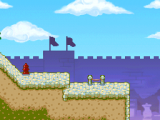
The area in which the Boulder is first drawn.
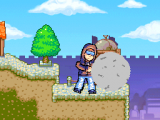
A hero pushing a boulder.
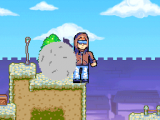
A boulder compared to a hero.
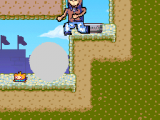
A boulder creation stuck in an inaccessible location after falling. The player is also stuck and must reset the level.
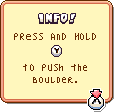
The dialog showing how to use the Boulder creation.

The switches the boulder creation must rest on for the platforms to move.


References
