Difference between revisions of "House"
From Drawn to Life Wiki
| Line 6: | Line 6: | ||
|created = [[Windy Hills]] | |created = [[Windy Hills]] | ||
|games = {{Icon|DTL}} | |games = {{Icon|DTL}} | ||
| − | |boxcolor= | + | |boxcolor=#ff6b10 |
}} | }} | ||
{{Quote|text=Color a house and bounce to new heights!|character=Draw Prompt}} | {{Quote|text=Color a house and bounce to new heights!|character=Draw Prompt}} | ||
| Line 32: | Line 32: | ||
</gallery> | </gallery> | ||
</center> | </center> | ||
| − | {{Navbox/Creation|Draw Mode|Drawn to Life|Rapoville|City Gate|House|boxcolor= | + | {{Navbox/Creation|Draw Mode|Drawn to Life|Rapoville|City Gate|House|boxcolor=#ff6b10}} |
[[Category:Drawn to Life]] | [[Category:Drawn to Life]] | ||
[[Category:City Gate]] | [[Category:City Gate]] | ||
Latest revision as of 05:48, 30 July 2024
| House | |
| Information | |
|---|---|
| Name | House |
| Use | Jumping to areas otherwise out of reach |
| Creation Type | Level Object |
| Has Preset | N/A |
| Template Needed | No |
| Created In/After | Windy Hills |
| Game(s) | 
|

“Color a house and bounce to new heights!”
–Draw Prompt
Houses are creations in Drawn to Life, first drawn in the Windy Hills. Houses act as trampolines that the Hero can use to jump higher.
 Appearance[edit]

The creation outline is a simple house with a door, window, and roof. The appearance of this object is completely dependent on the player, but they are still confined to the outline provided.
 Levels[edit]
 Windy Hills |
Trivia[edit]
- Due to the effects of the Kaorin Berry, this creation appears much smaller relative to the giant Hero.
- However, it is actually slightly bigger than the normal houses of the same shape seen in levels.
 Media[edit]

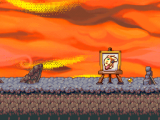
The area where this creation is drawn.
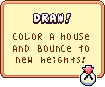
The drawing prompt for this creation.


