Difference between revisions of "3 Way Switch"
| (9 intermediate revisions by 4 users not shown) | |||
| Line 1: | Line 1: | ||
| − | |||
{{Infobox/Creation | {{Infobox/Creation | ||
| − | |image=[[File:Drawing3WaySwitch.png|center]] | + | |image=[[File:Drawing3WaySwitch.png|center|alt=3 Way Switch Template]] |
|name=3 Way Switch | |name=3 Way Switch | ||
|type=Level Object | |type=Level Object | ||
| Line 9: | Line 8: | ||
|created=[[Gearworks]] | |created=[[Gearworks]] | ||
|games={{Icon|DTL}} | |games={{Icon|DTL}} | ||
| + | |boxcolor=#503ae1 | ||
| + | }} | ||
| + | {{PDisambig|Platform}} | ||
| + | {{Quote | ||
| + | |text=This switch activates red, blue, and green platforms. | ||
| + | |character=Design Prompt | ||
}} | }} | ||
| − | |||
| − | |||
'''3 Way Switches''' are creations drawn in [[Gearworks]] in ''[[Drawn to Life]]''. 3 Way Switches are composed of three corresponding platforms (colored red, blue, and green) that switch movements each time the switch is touched on the touch screen. | '''3 Way Switches''' are creations drawn in [[Gearworks]] in ''[[Drawn to Life]]''. 3 Way Switches are composed of three corresponding platforms (colored red, blue, and green) that switch movements each time the switch is touched on the touch screen. | ||
| Line 25: | Line 28: | ||
<table style="width: 100%; padding: 10px;"> | <table style="width: 100%; padding: 10px;"> | ||
<tr> | <tr> | ||
| − | <td><center> [[File:28twillight004.png|link=Gearworks]] <br> [[Gearworks]] </center></td> | + | <td><center> [[File:28twillight004.png|link=Gearworks|alt=Gearworks Level Icon]] <br> [[Gearworks]] </center></td> |
</tr> | </tr> | ||
</table> | </table> | ||
| − | =={{ | + | == {{IconSVG|Trivia}} Trivia == |
* Despite being named "3 Way Switch", only the moving platform can be created by the player. | * Despite being named "3 Way Switch", only the moving platform can be created by the player. | ||
* In game, the words 'red', 'blue', and 'green' in the design prompt are in their respective colors. | * In game, the words 'red', 'blue', and 'green' in the design prompt are in their respective colors. | ||
| − | ** The specific [ | + | ** The specific [[:wikipedia:Web colors|hex codes]] for these colors are #FF0016, #0025FA, and #00A325. |
*** None of these colors are pure and each has one other color mixed along with it. However, the purest color in this list would be red, which is 100% red mixed with 8.6% blue. (As the red colorspace is indexed as "FF", the highest possible color value in the hex format.) | *** None of these colors are pure and each has one other color mixed along with it. However, the purest color in this list would be red, which is 100% red mixed with 8.6% blue. (As the red colorspace is indexed as "FF", the highest possible color value in the hex format.) | ||
=={{Icon|PaintingIcon}} Media== | =={{Icon|PaintingIcon}} Media== | ||
| + | <center> | ||
<gallery orientation="none" position="center" widths="310" spacing="small" bordercolor="transparent" bordersize="small" captiontextcolor="#8e8e8e" captionalign="center" captionposition="below"> | <gallery orientation="none" position="center" widths="310" spacing="small" bordercolor="transparent" bordersize="small" captiontextcolor="#8e8e8e" captionalign="center" captionposition="below"> | ||
| − | 3WaySwitchDrawingLocation.png|The location where 3 Way Switch is drawn. | + | 3WaySwitchDrawingLocation.png|alt=Screenshot of the Draw Mode easel|The location where 3 Way Switch is drawn. |
| − | + | SwitchDrawingPrompt.png|alt=Screenshot of the Draw Mode Prompt|The drawing prompt for this creation. | |
| − | + | SwitchEx.png|alt=Screenshot of a player's design for the 3 Way Switch.|A player's design for the 3 Way Switch. | |
| − | 3WaySwitch.png|The pre-colored switch that controls the platforms. | + | 3WaySwitch.png|alt=Screenshot of the switch|The pre-colored switch that controls the platforms. |
| − | Red3Switch.png|The switch while controlling red platforms. | + | Red3Switch.png|alt=Screenshot of the switch|The switch while controlling red platforms. |
| − | Blue3Switch.png|The switch while controlling blue platforms. | + | Blue3Switch.png|alt=Screenshot of the switch|The switch while controlling blue platforms. |
| − | Green3Switch.png|The switch while controlling green platforms. | + | Green3Switch.png|alt=Screenshot of the switch|The switch while controlling green platforms. |
</gallery> | </gallery> | ||
| − | + | </center> | |
| − | + | {{Navbox/Creation|boxcolor=#503ae1|Drawn to Life|Rapoville|Forest Gate|Gearworks|3 Way Switch}} | |
| − | {{Navbox/Creation|Drawn to Life|Rapoville|Forest Gate|Gearworks|3 Way Switch}} | ||
| − | |||
__NOTOC__ | __NOTOC__ | ||
[[Category:Drawn to Life]] | [[Category:Drawn to Life]] | ||
Latest revision as of 14:17, 11 July 2025
| 3 Way Switch | |
| Information | |
|---|---|
| Name | 3 Way Switch |
| Use | Moving platforms that are controlled by a switch |
| Creation Type | Level Object |
| Has Preset | No |
| Template Needed | No |
| Created In/After | Gearworks |
| Game(s) | 
|

For other uses of Platforms on the wiki, see Platform.
–Design Prompt
3 Way Switches are creations drawn in Gearworks in Drawn to Life. 3 Way Switches are composed of three corresponding platforms (colored red, blue, and green) that switch movements each time the switch is touched on the touch screen.
The platforms move along a predetermined pathway as indicated by the track of the corresponding color.
 Appearance[edit]

Due to the 3 Way Switch being a creation object and having no pre-drawn preset or guide, the appearance of this object is completely dependent on the player.
They are still confined to a 95px × 23px area.
 Levels[edit]
 Gearworks |
Trivia[edit]
- Despite being named "3 Way Switch", only the moving platform can be created by the player.
- In game, the words 'red', 'blue', and 'green' in the design prompt are in their respective colors.
- The specific hex codes for these colors are #FF0016, #0025FA, and #00A325.
- None of these colors are pure and each has one other color mixed along with it. However, the purest color in this list would be red, which is 100% red mixed with 8.6% blue. (As the red colorspace is indexed as "FF", the highest possible color value in the hex format.)
- The specific hex codes for these colors are #FF0016, #0025FA, and #00A325.
 Media[edit]

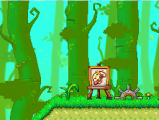
The location where 3 Way Switch is drawn.
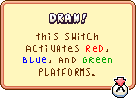
The drawing prompt for this creation.

A player's design for the 3 Way Switch.
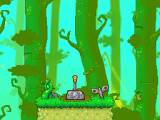
The pre-colored switch that controls the platforms.

The switch while controlling red platforms.
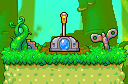
The switch while controlling blue platforms.
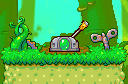
The switch while controlling green platforms.


