Difference between revisions of "Rocket"
m |
|||
| Line 8: | Line 8: | ||
|created=[[Moon Grove]] | |created=[[Moon Grove]] | ||
|games={{Icon|DTLLogo}} | |games={{Icon|DTLLogo}} | ||
| − | |boxcolor= | + | |boxcolor=#503ae1 |
}} | }} | ||
{{Disambig|The [[Shooter Ship]], [[Rocket Ship|Two Realms creation]] or [[Rocket Ship (SpongeBob SquarePants Edition)|SpongeBob creation]]}} | {{Disambig|The [[Shooter Ship]], [[Rocket Ship|Two Realms creation]] or [[Rocket Ship (SpongeBob SquarePants Edition)|SpongeBob creation]]}} | ||
| Line 51: | Line 51: | ||
</gallery> | </gallery> | ||
</center> | </center> | ||
| − | {{Navbox/Creation|boxcolor= | + | {{Navbox/Creation|boxcolor=#503ae1|Drawn to Life|Forest Gate|Moon Grove|Rocket}} |
__NOTOC__ | __NOTOC__ | ||
[[Category:Drawn to Life]] | [[Category:Drawn to Life]] | ||
Latest revision as of 02:02, 30 July 2024
| Rocket | |
| Information | |
|---|---|
| Name | Rocket |
| Use | Acts as a mode of transportation for The Hero |
| Creation Type | Level Object |
| Has Preset | No |
| Template Needed | No |
| Created In/After | Moon Grove |
| Game(s) | 
|

Not to be confused with The Shooter Ship, Two Realms creation or SpongeBob creation.
–Design Prompt
The Rocket is a creation and a transportation device in Drawn to Life that is first drawn in Moon Grove. The Hero can fire missiles at Star Baki using the attack button.
 Appearance[edit]

Due to the Rocket being a creation object and having no pre-drawn preset or guide, the appearance of this object is completely dependent on the player.
They are still confined to a rocket shaped area which must be used as a base shape.
 Levels[edit]

Trivia[edit]
- The color of the rocket's flame is the same color as the village's Eternal Flame.
- The player cannot create the projectiles the Rocket fires as they can in Drawn to Life: The Next Chapter for the Shooter Ship.
- On the Forest Gate World Map, an orange-and-yellow rocket is seen.
 Bugs[edit]

There is a bug where if the drawing is zoomed into while the grid is on, a small rocket with a grid appears. The black outline appears to obscure the drawing.
 Media[edit]


The Rocket Grid glitch. A red line is added through showing how the extra outline interacts with drawing.

A rocket can be seen on the Forest Gate World Map.
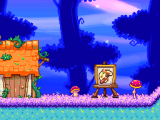
The area where this creation is drawn.

The drawing prompt for this creation.
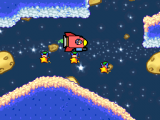
The Hero in a Rocket.

The projectile shot by the Rocket.


