Difference between revisions of "Falling Chair"
| Line 3: | Line 3: | ||
|image=[[File:ChairTemp.png|center]] | |image=[[File:ChairTemp.png|center]] | ||
|name=Falling Chair | |name=Falling Chair | ||
| − | |use=Allows [[ | + | |use=Allows the [[Hero]] to progress |
|type=Level Object | |type=Level Object | ||
|template=No | |template=No | ||
| Line 11: | Line 11: | ||
|games={{Icon|DTL}} | |games={{Icon|DTL}} | ||
}} | }} | ||
| − | |||
{{Quote|text=Create some tumbling chairs!|character=Design Prompt}} | {{Quote|text=Create some tumbling chairs!|character=Design Prompt}} | ||
| − | '''Falling Chairs''' are creations in ''[[Drawn to Life]]''. They are first drawn in [[Rapo Towers]]. | + | '''Falling Chairs''' are creations in ''[[Drawn to Life]]''. They are first drawn in [[Rapo Towers]]. The chairs are attached to chains that move them down. The [[Hero]] has to climb up numerous lines of chairs throughout the level to progress. |
| − | |||
| − | The chairs are attached to chains that move them down. [[ | ||
=={{Icon|TowerIcon}} Appearance== | =={{Icon|TowerIcon}} Appearance== | ||
| Line 24: | Line 21: | ||
=={{Icon|Button}} Levels == | =={{Icon|Button}} Levels == | ||
| − | + | <table style="width:100%; padding-top:10px;"> | |
| − | + | <tr> | |
| − | + | <td><center> [[File:Th_city004.png|center|link=Rapo Towers]] <br> [[Rapo Towers]] </center></td> | |
| + | </tr> | ||
| + | </table> | ||
=={{Icon|Question}} Trivia== | =={{Icon|Question}} Trivia== | ||
| Line 32: | Line 31: | ||
=={{Icon|PaintingIcon}} Media== | =={{Icon|PaintingIcon}} Media== | ||
| + | <center> | ||
<gallery widths="310" captionsize="medium" captiontextcolor="#8e8e8e" bordersize="none" bordercolor="transparent" captionalign="center" spacing="small" position="center"> | <gallery widths="310" captionsize="medium" captiontextcolor="#8e8e8e" bordersize="none" bordercolor="transparent" captionalign="center" spacing="small" position="center"> | ||
| − | + | FallingChairDrawingLocation.png|The area where this creation is drawn. | |
| − | + | FallingChairDrawingPrompt.png|The drawing prompt for this creation. | |
| − | |||
</gallery> | </gallery> | ||
| − | + | </center> | |
| − | + | {{Navbox/Creation|Drawn to Life|City Gate|Rapo Towers|Falling Chair}} | |
| − | {{Navbox/Creation}} | ||
__NOTOC__ | __NOTOC__ | ||
Revision as of 16:45, 22 December 2021
This Article or Section is a Stub! This article or section is either too short or is missing too much vital information to be able to stand on its own.
You can help our Wiki by expanding this page, any edit helps!
If after an edit is made and the article or section is no longer a stub then please remove the {{stub}} template and all categories associated with it. |
| Falling Chair | |
| Information | |
|---|---|
| Name | Falling Chair |
| Use | Allows the Hero to progress |
| Creation Type | Level Object |
| Has Preset | No |
| Template Needed | No |
| Created In/After | Rapo Towers |
| Game(s) | 
|

–Design Prompt
Falling Chairs are creations in Drawn to Life. They are first drawn in Rapo Towers. The chairs are attached to chains that move them down. The Hero has to climb up numerous lines of chairs throughout the level to progress.
 Appearance

Due to the Falling Chairs being a creation object and having no pre-drawn preset or guide, the appearance of this object is completely dependent on the player; though they are still confined to the area provided.
The creation's shape is a chair viewed from the front.
 Levels
 Rapo Towers |
Trivia
- This creation is only used in Rapo Towers.
 Media
Media

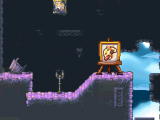
The area where this creation is drawn.
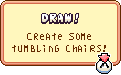
The drawing prompt for this creation.


