Difference between revisions of "Button"
From Drawn to Life Wiki
(alt) |
|||
| Line 53: | Line 53: | ||
<gallery widths="310" captionsize="medium" captiontextcolor="#8e8e8e" bordersize="none" bordercolor="transparent" captionalign="center" spacing="small" position="center"> | <gallery widths="310" captionsize="medium" captiontextcolor="#8e8e8e" bordersize="none" bordercolor="transparent" captionalign="center" spacing="small" position="center"> | ||
WiiButtonDrawingLocation.png|alt=Game screenshot|The area where this creation is drawn. | WiiButtonDrawingLocation.png|alt=Game screenshot|The area where this creation is drawn. | ||
| + | BetaWiiButton.png|Early version of the template. | ||
</gallery> | </gallery> | ||
</center> | </center> | ||
Revision as of 21:28, 25 May 2023
This Article Contains Non-Canon Content! This page contains content that is not a part of the official canon. Drawn to Life: SpongeBob SquarePants Edition. Non-canon media includes; theories, fan art, speculation, or games published by developers other than 5th Cell or Digital Continue. |
| Button | |
| Information | |
|---|---|
| Name | Button |
| Use | Changing direction of Conveyor Belt |
| Creation Type | Level Object |
| Has Preset | Yes |
| Template Needed | No |
| Created In/After | Shadow Palace |
| Game(s) | 
|


“Draw a Button which you can press to make things happen!”
–Draw Prompt
The Button is a creation in Drawn to Life: The Next Chapter (Wii) that is drawn in Shadow Palace.
Once drawn, the Button will appear near Conveyor Belts or other toggleable objects, and it allows the Hero to change the direction of the Belts, or impact the surrounding area in some noticeable way.
 Appearance

Due to the Button being a creation object, the appearance of this object is completely dependent on the player.
The preset drawing for this creation is a shiny purple bulb inside of a golden frame.
 Levels


Trivia
- This is one of the few creations to appear outside the Gate it originated in, Rapoville notwithstanding.
- The other creations are the Heart, Trampoline, Vertical Platform, Horizontal Platform, and Conveyor Belt.
 Media
Media

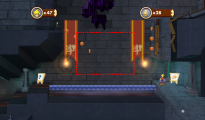
The area where this creation is drawn.

Early version of the template.


