Difference between revisions of "Spring"
From Drawn to Life Wiki
| Line 9: | Line 9: | ||
|created=[[Snow Caves]] | |created=[[Snow Caves]] | ||
|games={{Icon|Drawn to Life}} | |games={{Icon|Drawn to Life}} | ||
| + | |boxcolor=grey | ||
}}{{Quote | }}{{Quote | ||
|text=Boooinngg! Design a bouncy spring! | |text=Boooinngg! Design a bouncy spring! | ||
| Line 37: | Line 38: | ||
</gallery> | </gallery> | ||
---- | ---- | ||
| − | {{Navbox/Creation|Drawn to Life|Snow Gate|Snow Caves|Spring}} | + | {{Navbox/Creation|boxcolor=grey|Drawn to Life|Snow Gate|Snow Caves|Spring}} |
__NOTOC__ | __NOTOC__ | ||
Revision as of 01:50, 27 June 2024
Not to be confused with the Toy or Super Spring.
| Spring | |
| Information | |
|---|---|
| Name | Spring |
| Use | Meshy platform the Hero can use to gain height for their jumps. |
| Creation Type | Level Object |
| Has Preset | No |
| Template Needed | No |
| Created In/After | Snow Caves |
| Game(s) | 
|

“Boooinngg! Design a bouncy spring!”
–Draw Prompt
Springs are creations in Drawn to Life used to launch The Hero short vertical distances. Like many other level-drawn creations, the appearance of the Spring is completely dependent on the player.
They are created in the Snow Caves and are the predecessor to the Super Spring, another creation drawn in the same level. They make no other appearances in other levels.
 Appearance

Due to Springs being a creation object and having no pre-drawn preset or guide, the appearance of this object is completely dependent on the player.
However, they are still confined to a 48px × 32px area.
 Levels
 Snow Caves |
Trivia
- Enemies are unable to interact with this creation and will simply phase through it.
 Media
Media


The drawing prompt for this creation.
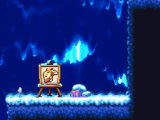
The area where this creation is drawn.


