Difference between revisions of "Chandelier"
From Drawn to Life Wiki
| Line 8: | Line 8: | ||
|levels=[[Rapo Towers]] | |levels=[[Rapo Towers]] | ||
|games={{Icon|DTL}} | |games={{Icon|DTL}} | ||
| − | |boxcolor= | + | |boxcolor=#196b8c |
}} | }} | ||
{{disambig|[[Chandelier (SpongeBob SquarePants Edition)|the SpongeBob Creation]]}} | {{disambig|[[Chandelier (SpongeBob SquarePants Edition)|the SpongeBob Creation]]}} | ||
| Line 47: | Line 47: | ||
---- | ---- | ||
| − | {{Navbox/Creation|Drawn to Life|City Gate|Rapo Towers|Chandelier|boxcolor= | + | {{Navbox/Creation|Drawn to Life|City Gate|Rapo Towers|Chandelier|boxcolor=#196b8c}} |
__NOTOC__ | __NOTOC__ | ||
Latest revision as of 05:49, 30 July 2024
| Chandelier | |
| Information | |
|---|---|
| Name | Chandelier |
| Use | A platform the player can swing back and forth using the D-pad |
| Creation Type | N/A |
| Has Preset | No |
| Template Needed | No |
| Created In/After | Rapo Towers |
| Game(s) | 
|

Not to be confused with the SpongeBob Creation.
“Draw a swinging chandelier!”
–Design Prompt
“Use the +Control Pad to swing it back and forth!”
–Info Prompt
Chandeliers are creations in Drawn to Life, first drawn in Rapo Towers.
Chandeliers swing back and forth allowing The Hero to reach higher platforms and move throughout the level. When The Hero jumps onto the chandelier, the D-pad is used to move it back and forth.
 Appearance[edit]

Due to the Chandelier being a creation object and having no pre-drawn preset or guide, the appearance of this object is completely dependent on the player.
They are still confined to the outline provided.
 Levels[edit]

Trivia[edit]
- This is the second creation drawn in Rapo Towers.
 Media[edit]

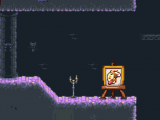
The area where this creation is drawn.
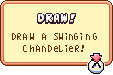
The drawing prompt for this creation.

A player's Chandelier design.

A hero riding a Chandelier.


