Difference between revisions of "Standard Platform"
From Drawn to Life Wiki
(Created page with "{{Infobox/Creation |image = <tabber> |-|Drawn Preset=center |-|Template Page=center </tabber> |n...") |
m |
||
| Line 91: | Line 91: | ||
=={{Icon|Painting}} Media== | =={{Icon|Painting}} Media== | ||
| + | <center> | ||
<gallery widths="310" captionsize="medium" captiontextcolor="#8e8e8e" bordersize="none" bordercolor="transparent" captionalign="center" spacing="small" position="center"> | <gallery widths="310" captionsize="medium" captiontextcolor="#8e8e8e" bordersize="none" bordercolor="transparent" captionalign="center" spacing="small" position="center"> | ||
StandardPlatformDrawingLocation.png|The area where this creation is drawn. | StandardPlatformDrawingLocation.png|The area where this creation is drawn. | ||
StandardPlatformDrawingPrompt.png|The drawing prompt for this creation. | StandardPlatformDrawingPrompt.png|The drawing prompt for this creation. | ||
</gallery> | </gallery> | ||
| + | </center> | ||
---- | ---- | ||
Revision as of 18:21, 15 February 2021
| Standard Platform | |
| Information | |
|---|---|
| Name | Standard Platform |
| Use | A platform for The Hero |
| Creation Type | Level Object |
| Has Preset | Yes |
| Template Needed | No |
| Created In/After | Forgotten Library |
| Game(s) | 
|


“Hero can jump onto these platforms and use them to reach new areas.”
–Draw Prompt
The Standard Platform is a creation in Drawn to Life: The Next Chapter that is drawn in the Forgotten Library.
Once drawn, this platform will float in the air and remain stationary, similar to the Cloud creation of the first game.
 Appearance

Due to the Standard Platform being a creation object, the appearance of this object is completely dependent on the player. They are still restricted to the area provided.
The preset drawing for this creation is a worn scroll.
 Levels
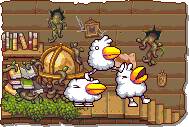


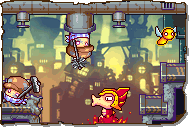
Trivia
- The Standard Platform is the first level creation in Drawn to Life: The Next Chapter.
- It is the only platform created on Turtle Rock.
 Media
Media

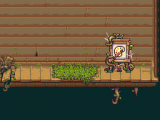
The area where this creation is drawn.
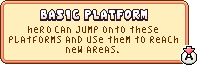
The drawing prompt for this creation.


