Draw Mode (Two Realms)
| Draw Mode (Two Realms) | |
| Use | Draw Mode |
| Village Object | No |
| Retrieved | At The Start (Hero) After Certain Stages Are Cleared |
| Location | Rapoville (First Time) Main Menu (After they're created) |
| Games |  |


Not to be confused with DS Games' Draw Mode.
Draw Mode, named the Creation Tool in-game, is one of the main creative modes in Drawn to Life: Two Realms, consisting of more different tools and features than the previous canon games. Draw Mode automatically activates every time the player goes to edit or draw an object, and create or edit the Hero at the start. Character creation also features 56 pre-made character templates - 38 of which are only available after downloading the Creative Pack.
There are some major differences to this Draw Mode compared to previous entries, one major one being the emphasis on non-touch based drawing. Introduced here are Stickers, multiple outfits being saved rather than full Heroes, and adjustable controller joystick sensitivity. This was done to mitigate the initial lack of touch-based drawing - a point of criticism between critics and fans alike, particularly with the Nintendo Switch version - although proper drawing controls and stylus support were added as part of the Creative Pack. This is also the only entry in the entire series to not have drawn objects featured in levels.
 Main Mode


Trivia
- According to Joseph Tringali, the added emphasis of controller-based drawing was done due to the difficulty of replicating the DS' touch screen[1].
- Touch support was added to the Nintendo Switch and Mobile versions, however, with the former's being added via the Creative Pack and the latter having touch-based drawing right at the start.
- Strangely, despite the emphasis on controller support, this is the only Draw Mode in the entire Drawn to Life Series to not have grid-based drawing.
- Both a Grid and Pattern icon were found in the game files, suggesting that these functions were cut from the final release.
- This is the first Draw Mode since Drawn to Life: The Next Chapter (Wii) to utilize Stamps.
- It is also the first entry since Drawn to Life: SpongeBob SquarePants Edition to lack the ability to create more than one Hero.
- There is also no Tutorial or Help Button of any kind.
- It is also the first entry since Drawn to Life: SpongeBob SquarePants Edition to lack the ability to create more than one Hero.
- Apple Pencil support for the iOS release was added via the Creative Pack.
 Media
Media


Draw

Erase

Fill

Stamps

Templates
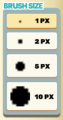
Brush Size

Undo

Redo

Clear All

Zoom Out

Zoom In

Lock Transparency

Unlock Transparency

Preview Hero

Eye Dropper


An unused Grid tool.

An unused Pattern tool.


